Why Go Online?
• Complaint Speed & Convenience: Skip the long lines and visit the e‑services portal anytime from home
• Transparency & Tracking: Every complaint gets a reference number and you can monitor progress online—no more uncertainty
• Accessibility: Villagers, working professionals, and commuters can file complaints without traveling to a police station .
What You Can Report

The portal covers cognizable and non‑cognizable offences—ranging from theft, cybercrime, document loss, traffic violations, to public nuisance
Plus, special services like Lost Document Reporting, FIR status checks, CSR status, vehicle checks, and more are available
3. Step‑by‑Step Process
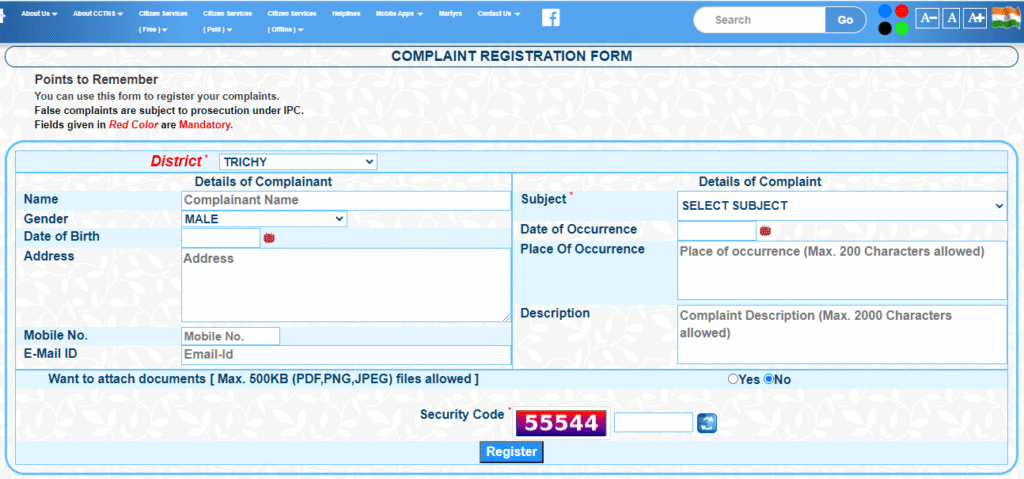
- “Register Online Complaint”
- Fill out the form:
- Choose district
- Provide your name, contact info, and incident details (date, place, description)
- Optionally, upload supporting documents (max ~50 KB each; PDF/JPEG/PNG)
- Enter the captcha and submit.
- You’ll receive a reference number—save it to track status later
4. Track Your Complain
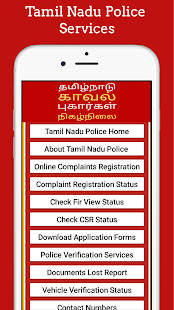
Log back on, select “Online Complaint Status”, then enter your reference number or mobile + captcha
You can also view FIRs, CSRs, or vehicle lookups in other sections.
5. What Happens Next?
Once filed:
- You may get an SMS from “TNPOL” confirming steps and updates
- If needed, the police may follow up via call or message—especially in cases like traffic challans or false FIRs.
6. Real‑World Experiences from Users
“I got a challan… mistakenly assigned… I filed a complaint… within 2 days, I received a call… got it transferred to the original violator.” — User on r/Chennai
But not everyone gets a quick resolution—one user notes after multiple attempts they ultimately paid the fine
Some complain the portal has ** glitches — e.g. missing updates or confusing date entries**
Tips for Successful Filing
- Upload clear evidence when contesting fines (photos, RV, etc.).
- Keep your reference number and check status regularly.
- If there’s any delay, escalate: local SHO → SP → DIG → IG → DGP
- For cyber issues, ring 1930 or use the National Cybercrime Portal
8. Other E‑Services Worth Exploring
Beyond complaints, try these on the portal/app:
- Lost Document Report (LDR) – get instant certificate for duplicate document applications
- FIR & CSR Status – track investigation or follow‑up.
- Vehicle history checks – see if a vehicle has cases or challans.
- Download accident & police verification documents
Final Thoughts
The TN Police’s online complaint portal is a valuable tool—offering speed, ease, transparency, and 24/7 access.
While glitches still happen, many complainants get timely help—from traffic challan corrections to document report confirmations.
To make the process smooth: attach clear documents, stay updated on status, and escalate using official channels if required.
Shared experiences show: when used well, the portal empowers citizens. Still, occasional hiccups remind us that persistence pays. Next time you need to submit a complaint—be it stolen property, cyber fraud, or wrongful challan—give the portal a go!
Stay informed. Stay empowered. 🧩
LIC’s Golden Jubilee Scholarship: Scholarships of ₹25,000+ for Every Student